Page 1 of 1
RDMLX
Posted: Sun Oct 05, 2014 1:26 am
by robdorn
Is there a way to disable the return key?
Thanks,
Rob
Re: RDMLX
Posted: Tue Oct 07, 2014 10:05 am
by MarkDuignan
I am not exactly sure what you mean. I think that usually the enter/return key does not appear for simple entry fields (textboxes) unless you enable it. Could you possibly post a screen shot of your whole form view and of the keyboard that appears to elaborate? Also – are you using iOS, Android or both?
Re: RDMLX Return Key
Posted: Tue Oct 07, 2014 10:15 am
by robdorn
I have the return key enabled and it executes a subroutine when pressed. If I display a popup message and the user clicks ok or cancel within the message everything is ok. If the user clicks return then it executes the subroutine and kicks them out of the application. They shouldn't be able to press the return key when the message is displayed.
Thanks,
Rob
Re: RDMLX
Posted: Tue Oct 07, 2014 10:28 am
by MarkDuignan
Is the pop up message you own popover form - or simple message box?
Re: RDMLX
Posted: Tue Oct 07, 2014 10:30 am
by robdorn
In this case it's a pop over form but it's also happening on a simple message box.
Re: RDMLX
Posted: Tue Oct 07, 2014 10:49 am
by MarkDuignan
I am having trouble trying to construct a test example where both a message box and the keyboard are both visible at the same time.
Could you possibly post a screen shot so I can see what the form view behind the message box looks like?
BTW - we are talking about the virtual keyboard – not a real one?
Re: RDMLX
Posted: Wed Oct 08, 2014 4:22 am
by robdorn
Mark,
The keyboard is virtual. The application is on an Ipad. Here is an example of the text box that is executing the subroutine when the return key is pressed:
#COM_OWNER.Set_TextBox Name(ItemOrdTxt) Value('') Datatype('Number') Layout_Col(2) Layout_Row(2) Maxlength(15) Show_Popover(TRUE) Onreturnkey(ADD_ITEM) Hasfocus(TRUE)
This is an example of the Pop over form:
* A PopOver Label with a confirm dialog
#COM_OWNER.Set_TextBox Name('ItemOrdTxt') Show_Popover(TRUE)
* The popup is a form object itself, with its own fields and buttons and layout. Its constructed as a property of the ItemOrdTxt field
#COM_OWNER.Set Property('ItemOrdTxt.Popover.Type') To(Form)
#COM_Owner.Set_Label Name('ItemOrdTxt.Popover.Fields.MESSAGE1') Layout_Col(1) Layout_Row(1) Text('Item ' + #ItemOrdered + ' already exists click Cancel to not add it Click OK to add to existing QTY') Layout_Cols(2)
#Com_Owner.Set_Button Name('ItemOrdTxt.Popover.Fields.BUTTONOK') Text(OK) Onclick(OK_BUTTON) Layout_Col(1) Layout_Row(2)
#Com_Owner.Set_Button Name('ItemOrdTxt.Popover.Fields.BUTTONCANCEL') Text(Cancel) Onclick(CANCEL_BUTTON) Layout_Col(2) Layout_Row(2)
I am also attaching a joblog with the error I receive on the server.
Thanks,
Rob
Re: RDMLX
Posted: Wed Oct 08, 2014 3:53 pm
by MarkDuignan
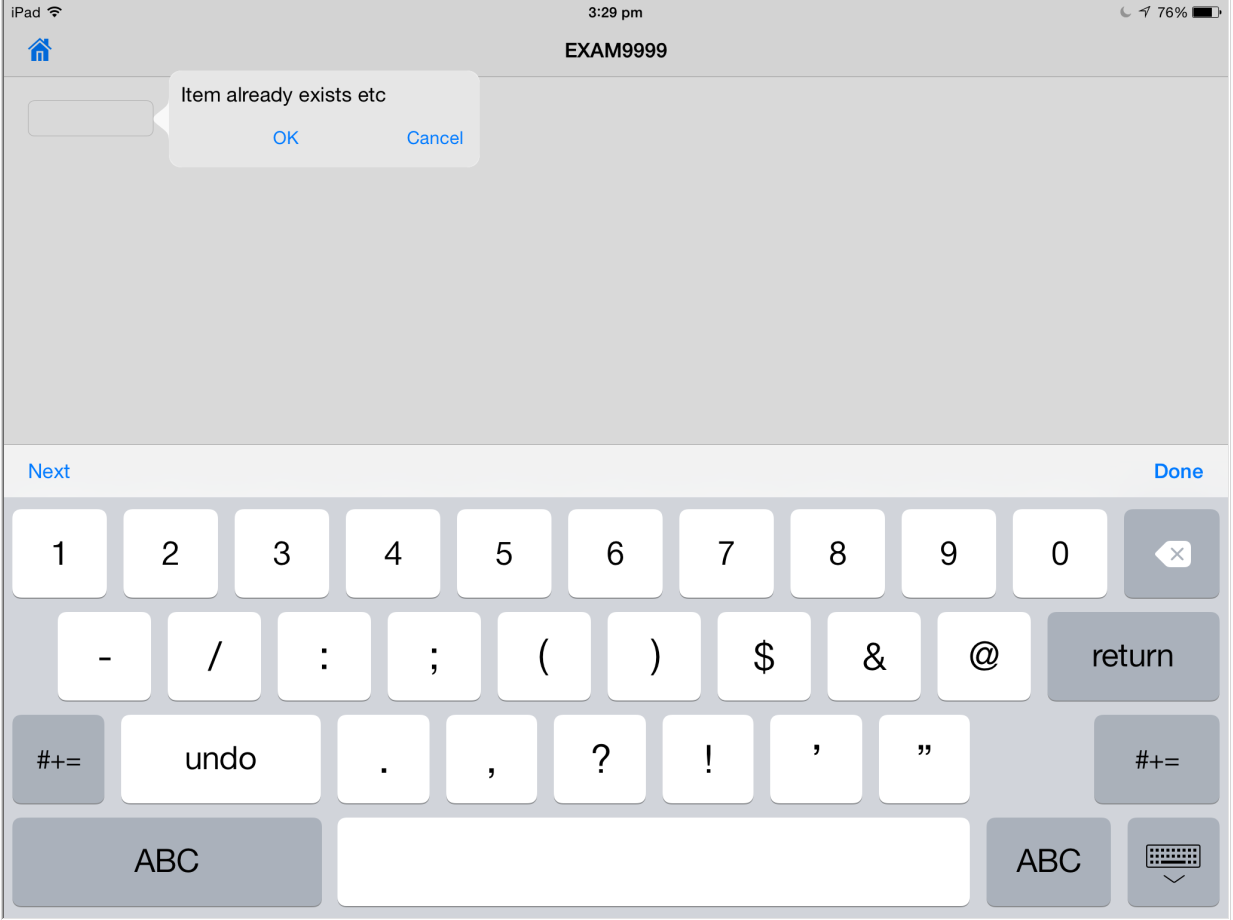
My LANSA system is out of action at the moment – but using RPG I got an example to look like this:
- image1.png (72.36 KiB) Viewed 6452 times
Is that what you have (and want) – with the focus in the input field, the keyboard visible and the pop over all displayed at the same time? If that is what you intend to do then I think you might struggle to get it to work properly – I think you normally need the user to dismiss a pop over before they can interact with the formview behind/below it. You are sort of bypassing that by putting the keyboard up with the HasFocus option and that might not reliably work.
I think that when the popover is displayed you should try not using the HasFocus(TRUE) so that the keyboard does not appear when the screen is initially displayed along with the pop over. Then the user has to use or dismiss the popover before starting to interact with the entry field. If you wanted to also disable the return key I guess you could try OnReturnKey(‘ ‘) or use the option to set the OnReturnKey property to null.
In your design is the popover meant to be fully modal – in the sense that user should use it or dismiss it before interacting with the parent formview behind/below it?
Re: RDMLX
Posted: Wed Oct 08, 2014 5:47 pm
by MarkDuignan
The server job log does not reveal anything much. You might try the Troubleshooting & Support option with System-level tracing turned on to get a server side trace.
This might reveal some more details about what is send to, and what happens on the server, when you press the return key. If you get the tracing turned on and find the trace file being produced - then run the app to just before the problem - then delete the trace file. Then execute the problem. This minimizes the trace data to just the problem area.