Page 1 of 1
Screen with multiple rows and columns (RPG)
Posted: Thu Jun 21, 2012 2:28 am
by MCUNNINGHAM
How do I divide a screen into a row covering the entire top 5% of the screen, and then two columns (one of 20% and another of 80%) below it. See the example below from the tutorials, but further dividing the red portion into two sections (perhaps red and green).
Re: Screen with multiple rows and columns
Posted: Thu Jun 21, 2012 9:41 am
by MarkDuignan
I think that the top cell (1,1) would have Width=Fill, Height=5% and Layout.Cols =-1 so it spans across all columns.
The left lower cell (1,2) would have Width=20%, Height=Fill.
The right lower cell (2,2) would have Width=50%, Height=Fill.
Happy to supply some code - please advise whether RPG or RDMLX format is best for you.
Re: Screen with multiple rows and columns
Posted: Thu Jun 21, 2012 1:05 pm
by MarkDuignan
The attached example RPG program contains a generic sub-function that can create screen content dynamically.
It builds the screens below using this RPG code
// Row: Col: Height: Width: Backcolor: TextColor: Text: RowSpan: ColSpan
MakeCell (1 : 1 : '5%' : 'Fill' :'Red' : 'White' : 'Top' : 0 : -1);
MakeCell (2 : 1 : 'Fill' : '50%' :'Blue' : 'White' : 'Left' : 0 : 0);
MakeCell (2 : 2 : 'Fill' : '50%' :'Green': 'White' : 'Right' : 0 : 0);
Hope this helps you experiment with different flow layouts.
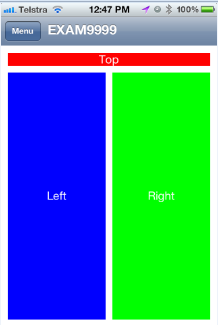
- iPhone Portait
- portrait.png (9.41 KiB) Viewed 5039 times
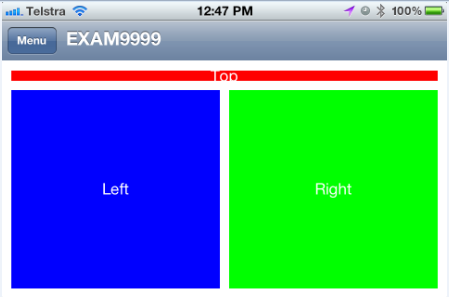
- iPhone Landscape
- LandScape.png (16.42 KiB) Viewed 5039 times
Re: Screen with multiple rows and columns (RPG)
Posted: Thu Jun 21, 2012 1:13 pm
by MarkDuignan
This change:
// Row Col Height Width Backcolor TextColor Text RowSp ColSp
MakeCell (1 : 1 : '5%' : 'Fill' :'Blue' : 'White' : 'Top' : 0 : -1);
MakeCell (2 : 1 : 'Fill' : '20%' :'Red' : 'White' : 'Left' : 0 : 0);
MakeCell (2 : 2 : 'Fill' : '80%' :'Green': 'White' : 'Right' : 0 : 0);
produces this screen below.
Also see
http://www.longrangemobile.com/docs/LRP ... anging.htm
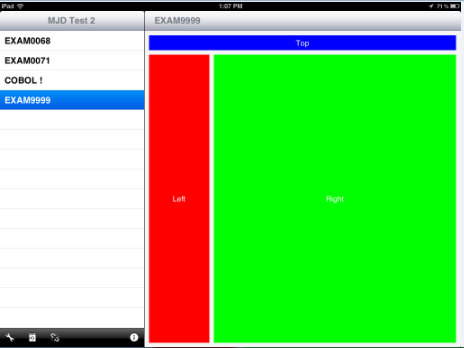
- iPad in Landscape mode
- iPadLandScape.png (14.3 KiB) Viewed 5035 times