Page 1 of 1
Scrolling in tables (RPG/DDS)
Posted: Tue Jul 24, 2012 6:15 pm
by JoeHam
If a table has more columns than can be shown on screen I can scroll sideways to see the remaining columns. This is working fine but the column headers remain fixed on top of the screen and do not fit together with the shown data.
How can this be changed?
Re: Scrolling in tables (RPG/DDS)
Posted: Wed Jul 25, 2012 8:34 am
by MarkDuignan
The simplest solution is to make the table (and your whole Form View) wider that the screen.
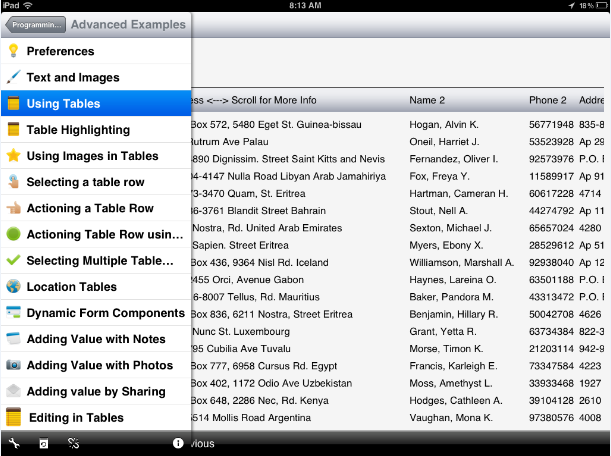
The shipped 'Advanced Examples' -> 'Using Tables' shows 9 different table display techniques. Use the ‘Next’ command to go to the ‘FormView_4 – Wide table – 50 Rows’ display for an example of a table that is wider than the screen. Code is in file LRNG_DEMO/SOURCEXAM members EXAM0004 (RPG) and EXAM0004D (DSPF).
What these examples do not show is how to make the table wider than the screen, allow it to scroll left and right with its headings, but prevent other things on the screen from also scrolling. This is slightly more complex to set up – but I can post an example if this is what you want to do.
- Post.png (96.25 KiB) Viewed 6125 times
Re: Scrolling in tables (RPG/DDS)
Posted: Wed Jul 25, 2012 5:57 pm
by JoeHam
Thank you, Mark
An example would be great - scrolling the list without moving the rest of the screen is exactly what we need.
Re: Scrolling in tables (RPG/DDS)
Posted: Thu Jul 26, 2012 10:06 am
by MarkDuignan
Attached find updated code for the shipped RPG building block “search and select” program.
Use is to replace shipped source code members:
• SEARCHSEL in LRNG_PROJ/QDDSSRC
• STDINCLUDE in LRNG_PROJ/QRPGLESRC
• SEARCHSEL in LRNG_PROJ/QRPGLESRC
Then recompile display file LRNG_PROJ/SEARCHSEL and RPG program LRNG_PROJ/SEARCHSEL.
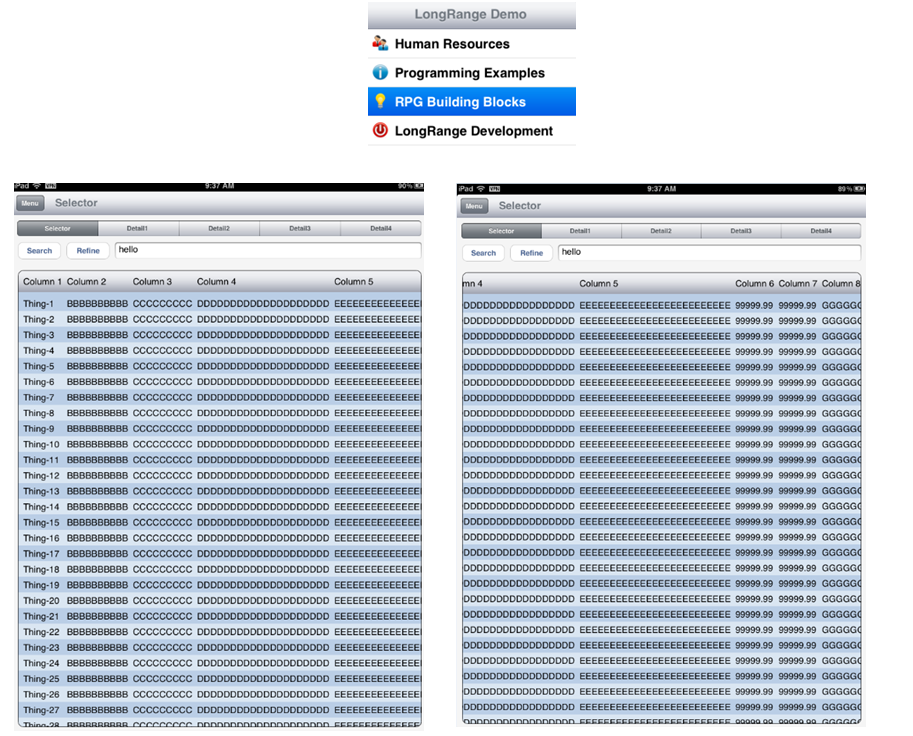
When you run the RPG Build Block Search and select example you should now see 9 example columns in the table - noting that they will not all fit on the screen at once. The table can be scrolled left and right without scrolling the whole form. This makes it a simple design for dual purpose use on iPhones as well.
- Shot.png (452.86 KiB) Viewed 6111 times
The main thing to note is how the DDS now define the table inside a form (or a sub-form might be a better name). This form fills the screen – but the table inside it can be as wide as you like and may be scrolled left and right independently of the outer form. This also means the subroutine AddResultsTableRow needs to use a slightly different LRNG_Using() operation to make sure it was addressing the row in the table in the sub-form.
The code is from the next LongRange version so I might have left something out + you get some other example stuff like alternated rows colours, search refinement, etc. If there’s a problem just post the details.
Re: Scrolling in tables (RPG/DDS)
Posted: Thu Jul 26, 2012 10:26 am
by MarkDuignan
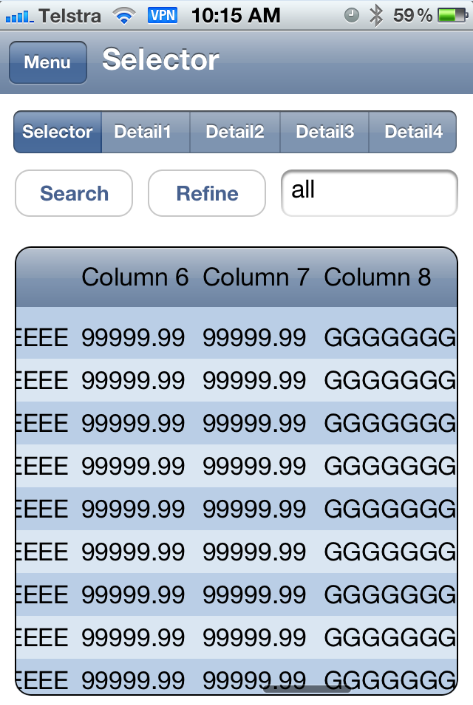
Here is a screen shot on an iPhone of the same program with the table scrolled about 2/3 across.
The table and its headings scroll left/right/up/down but the search buttons and fields do not move.
This seems like a reasonable way to show a lot of tabular information to an iPhone user – if that is what you need to do.
- Shot2.png (129.85 KiB) Viewed 6107 times
Re: Scrolling in tables (RPG/DDS)
Posted: Thu Jul 26, 2012 6:41 pm
by JoeHam
Thank you Mark,
this is exactly what I had in mind!
Re: Scrolling in tables (RPG/DDS)
Posted: Fri Sep 07, 2012 10:33 am
by MarkDuignan