Page 1 of 1
(RDMLX) LRUSHOWPP : Show a popover message
Posted: Fri Apr 25, 2014 3:49 am
by stevec
I have been using this for the pop over field in error capability but it does not work on drop downs. Looking at the code I think it is due to changing the drop down to a text box on statement 64
#com_owner.Set_TextBox Show_Popover(True) Name(#com_owner.uOverElement.trim)
Has anyone enhanced this to look at the element type and set accordingly? What would code change need to be to get this to work with drop downs and other types?
Re: LRUSHOWPP : Show a popover message
Posted: Fri Apr 25, 2014 4:04 am
by stevec
Figured it out
#COM_OWNER.Get Property(#com_owner.uOverElement.trim + '.Type') Into(#ElementType)
Case Of_Field(#ELEMENTTYPE)
When Value_Is(= TextBox)
#com_owner.Set_TextBox Show_Popover(True) Name(#com_owner.uOverElement.trim)
When Value_Is(= DropDown)
#com_owner.Set_Dropdown Show_Popover(True) Name(#com_owner.uOverElement.trim)
Endcase
Re: LRUSHOWPP : Show a popover message
Posted: Fri Apr 25, 2014 6:15 am
by stevec
This worked great until a component calls it that is "using" in which case the property is not found.
I tried many combinations but am having no luck getting the property type. What is the secret to get properting when "using"?
Re: (RDMLX) LRUSHOWPP : Show a popover message
Posted: Mon Apr 28, 2014 10:40 am
by Mark_Dale
I don't think in your case you need to get the element type, and handle the different types.
You could just use:
#Com_Owner.Set Property(#com_owner.uOverElement + '.ShowPopover') To('TRUE')
Re: (RDMLX) LRUSHOWPP : Show a popover message
Posted: Mon Apr 28, 2014 12:47 pm
by Mark_Dale
I don't think the problem getting the type of an element is due to the use of Using.
I think more likely it is because most properties are not returned by the client to the server (for performance reasons), and Type is one of those properties.
So this will not return anything to #lr_wkType
#Com_Owner.Using Element('/Form.Fields')
#COM_OWNER.IsNewForm := False
#Com_Owner.Get Property('MYTEXTBOX1.TYPE') InTo(#lr_wkType)
But this will return a value to #lr_wkValu (because the Value property of a textbox IS returned to the server)
#Com_Owner.Using Element('/Form.Fields')
#COM_OWNER.IsNewForm := False
#Com_Owner.Get Property('MYTEXTBOX1.VALUE') InTo(#vf_wkvalu)
And this will return a value to #lr_wkType (because the server has just set the Type property)
#Com_Owner.Using Element('/Form.Fields')
#COM_OWNER.IsNewForm := False
#Com_Owner.Set_TextBox NAME('MYTEXTBOX1') Layout_Row(2) Layout_Col(1)
#Com_Owner.Get Property('MYTEXTBOX1.TYPE') InTo(#vf_wkType)
Re: (RDMLX) LRUSHOWPP : Show a popover message
Posted: Mon Apr 28, 2014 1:02 pm
by stevec
Hmm
It has been consistently working to resolve type when not "nested using" and on some different types like dropdown and image.
Re: (RDMLX) LRUSHOWPP : Show a popover message
Posted: Tue Apr 29, 2014 8:55 am
by MarkDuignan
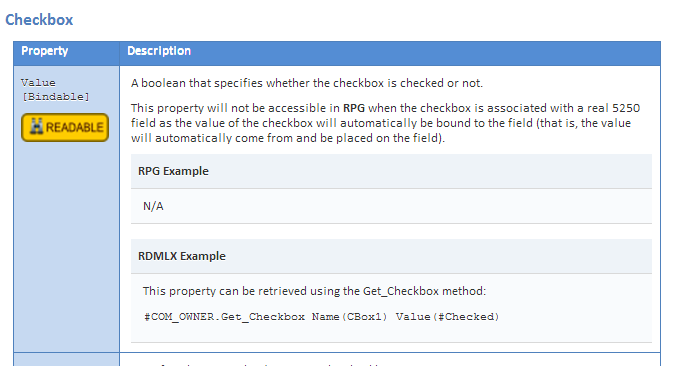
You should only ever attempt to read (ie: get) properties that are marked as READABLE in the documentation.
Getting other properties would result in an undefined/unknown/unpredictable result and is not supported.
The READABLE marker against the property in the documentation indicates which properties you can reliably read/get.
- Image1.png (20.06 KiB) Viewed 4755 times