Page 1 of 1
(RPG / DDS ) Creating more complex table layouts
Posted: Tue Jul 24, 2012 11:25 am
by MarkDuignan
This example demonstrates
• How to create tables with rows that contain more complex multi-line layouts
• How simple code changes can radically alter the appearance of an App.
The example produces example screens like this:
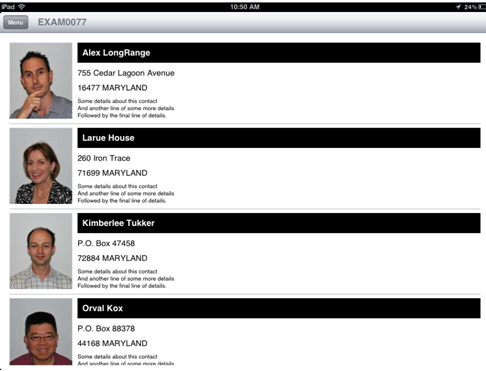
- shot1.png (64.65 KiB) Viewed 9653 times
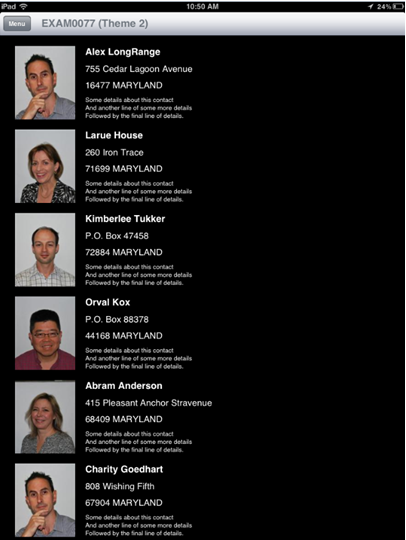
- shot2.png (101.45 KiB) Viewed 9653 times
See attached MS-Word document for all details.
Re: (RPG / DDS ) Creating more complex table layouts
Posted: Tue Jul 24, 2012 4:51 pm
by soapagent
Can this be done in RDMLX? If so can you post an example.
Cheers
Re: (RPG / DDS ) Creating more complex table layouts
Posted: Wed Jul 25, 2012 8:55 am
by MarkDuignan
Anything you can do in RPG you can do in RDMLX - and vice versa.
If time permits I will post an example - or maybe someone else could?
Re: (RPG / DDS ) Creating more complex table layouts
Posted: Thu Sep 06, 2012 6:32 am
by rgjohnson
Hey Mark,
I used this technique on a table and it works great. In my table one of the elements being displayed is a button. When the user touches the button I want to retrieve values from the elements in that table entry. I set the LRNG_Using to the exact same thing I did when I first populated the values in each element, but when I try to LRNG_getProperty from those same elements to retrieve the value I always get blanks. Is there a trick to getting the values from a specific table entry?
Re: (RPG / DDS ) Creating more complex table layouts
Posted: Fri Sep 07, 2012 10:16 am
by MarkDuignan
When you set up each individual button you can add parameter(s) to it.
When it is touched these get sent back so that the server can work out which button and in what context was used.
So when setting up the button you might do this:
Code: Select all
LRNG_SetProperty('OnClick':'CLICK_SAVE');
LRNG_SetProperty('OnClick.Param%1': %trim(OrderNo));
LRNG_SetProperty('OnClick.Param%2':%trim(CustomerNo));
So RequestACTION = ‘CLICK_SAVE’ in tells you that one of the save buttons (say) was touched.
You then use ............
Code: Select all
LRNG_GetProperty('/CurrentOp.Param%1':OrderNo: %size(OrderNo));
LRNG_GetProperty('/CurrentOp.Param%2':CustNo: %size(CustNo));
to find out which save button and in what context.
This technique works beyond tables (eg: the new generic photo and note example use this technique across multiple pop over displays to track which customer, product, invoice, etc they are working with). You can start to create RPG based “reusable parts” much like real OO languages do by using this technique.
Another simpler technique is when the OnClick value for each button is set to something that has an identifiable substring ‘pattern’ that also includes the identifier - like “CLICK_SAVE_657585” where 657585 is the associated order number (say).
Re: (RPG / DDS ) Creating more complex table layouts
Posted: Fri Sep 07, 2012 10:40 am
by MarkDuignan
Re: (RPG / DDS ) Creating more complex table layouts
Posted: Tue Sep 11, 2012 1:49 am
by rgjohnson
Thanks Mark. That would work in a lot of cases. Say for example though in your example above that you wanted to add a "Map It" button to each table entry. On clicking the button you wanted to use the address for that table entry and display it in a map element. Is it not possible to retrieve the address values from the elements of that employee's table entry?
Re: (RPG / DDS ) Creating more complex table layouts
Posted: Tue Sep 11, 2012 2:54 pm
by MarkDuignan
I think so. I guess it comes down to what you put into the 'parameters' – the customer number, relying on the server app to lookup the address details and prepare the mapping URL – or the address details, in which case the server app can be pretty dumb - even to the point that the "Map" button could be pre-filled with the action required - so that no further server interaction is required to open the map.
An example of the dumb server model is the shipped “Adding Values by Sharing” example (75).
Each 'Share' button has a message title (in parm 2) and message body in (parm 3) attached to it by EXAM0075A.
When the user touches a 'Share' button the dumb server program (EXAM0075B) formats the title and message parameters into an e-mail button and an SMS button – both ready to send the instant they are touched. The user can then initiate the email or the message without needing any further server interactions.
Re: (RPG / DDS ) Creating more complex table layouts
Posted: Wed Sep 12, 2012 12:29 am
by rgjohnson
I understand the parameter options on the buttons, but I am gathering that I cannot retrieve the .value property from the actual elements on the screen. Say your example here was a listing of products instead of employees, and I wanted to add a textbox as one of the table elements so the user could enter an order quantity. Would I be able to access the .value property of that textbox to retrieve the order quantity entered by the user? From everything I have tried it seems I cannot access the contents of the individual elements within each table row. Is that correct?
Re: (RPG / DDS ) Creating more complex table layouts
Posted: Wed Sep 12, 2012 10:05 am
by MarkDuignan
Sorry – I think I get it now - Yes - you should be able to do this.
Look at Advanced Example -> Adding values with Notes.
Touch any of the “No Notes” buttons to create a note by using a generic pop over.
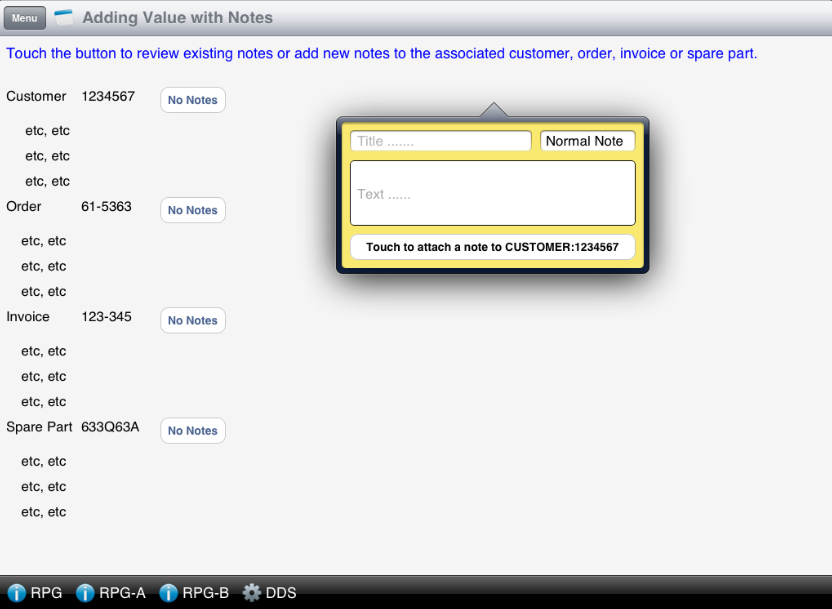
- Capture.PNG (89.71 KiB) Viewed 9495 times
The yellow input popover is created by subroutine POSTNOTE_New_Note in program EXAM0068B.
It puts the input textboxes TITLE and TEXT onto the screen and creates a drop down named COLOR.
The “Touch to attach a note to xxxxxxxx” button is named SAVE has this logic ..........
Code: Select all
LRNG_SetProperty('OnClick' : 'EXAM0068B_SAVE_NOTE');
LRNG_SetProperty('OnClick.Param%1':%trim(AssocContainer)); <====   Identifies this instance - the source or container element
LRNG_SetProperty('OnClick.Param%2':%trim(AssocNotesKey));  <===== Identifies data key (eg:Customer)
When you touch the SAVE button the subroutine POSTNOTE_Save_Note fires.
The values you typed into text boxes TITLE and TEXT and the selected COLOR are retrieved into RPG fields like this:
Code: Select all
// Get the ‘container’ that owns the popover that is sending the request into RPG field AssocContainer .........
LRNG_GetProperty('/CurrentOp.Param%1' : AssocContainer : %size(AssocContainer) );

// Get the title and text

LRNG_Using(%trim(AssocContainer)+'.PopOver.Fields');
   LRNG_GetProperty('TITLE.Value' : NOTETITLE : %size(NOTETITLE) );
   LRNG_GetProperty('TEXT.Value'  : NOTETEXT  : %size(NOTETEXT) );
   LRNG_GetProperty('COLOR.Value' : NOTECOLOR : %size(NOTECOLOR) );
LRNG_EndUsing();
The main idea is that one of the parameters identifies the container/owner/source of the request.
If a table with input items was in the popover form you should be able to get their value(s) back into the program in much the same way.