Scrolling in table(RDMLX)

Please do not use to report errors- use your regional help desk.
Please mark posts as being for RPG or RDMLX (LANSA) developer.
To subscribe by email, display this forum, scroll to the end and select ‘Subscribe Forum’.
Post Reply
MegumiSawada
Posts: 268
Joined: Tue Feb 19, 2013 5:18 pm

Scrolling in table(RDMLX)

Post by MegumiSawada »

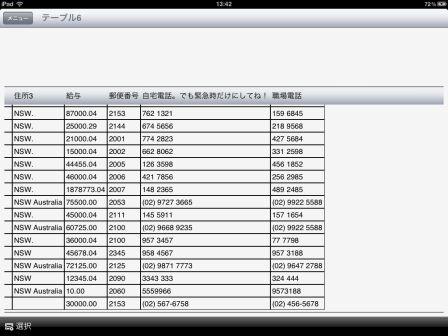
If a table has many columns which cannot be shown all within the screen I can scroll sideways to see the remaining columns. This is working fine if the table is the only object on the formview. However if there are some columns above the table and you combine a couple of columns to set up the table, headers remain fixed on top of the screen and do not fit together with the shown data.
How can this be changed to work fine?
What I can think of to work around this is to split a formview into 2 tables and put labels and dropdowns into the top table. Is there any other simple way to work around?
IMG_04221.jpg
IMG_04221.jpg (41.79 KiB) Viewed 7594 times
Paul

Re: Scrolling in table(RDMLX)

Post by Paul »

Hi Megumi,

Are the columns of your formview set to 'FILL''? This would lock the table headers in place and prevent the table headers scrowling with the table data because the form column is restricted to the width of the screen.

The default value for column widths is 'FIT' which would cause the column to be wide enough for your table. This should allow the table headers to scrowl with the table data.
MegumiSawada
Posts: 268
Joined: Tue Feb 19, 2013 5:18 pm

Re: Scrolling in table(RDMLX)

Post by MegumiSawada »

Hi Paul,

Yes,I set the fixed width for 4 columns and set 'FILL' to the 5th(most right) column.
I'll try to use 'FIT' for them and see the result.

Thank you for your advice!
MegumiSawada
Posts: 268
Joined: Tue Feb 19, 2013 5:18 pm

Re: Scrolling in table(RDMLX)

Post by MegumiSawada »

Hi Paul,
I'm still not able to get the screen as I expected.

If I delete layout_width(),then the table is collapsed as the first image.
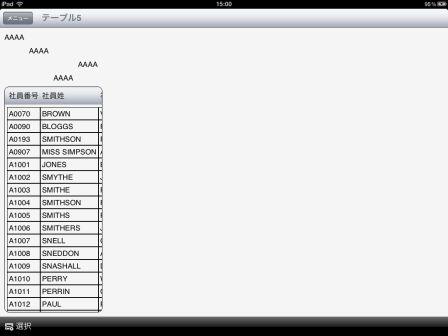
IMG_0425.jpg
IMG_0425.jpg (15.72 KiB) Viewed 7553 times
If I put layout_width(*Fill) to the fifth(most right) column, then the table expand too much as the second and thrid images.
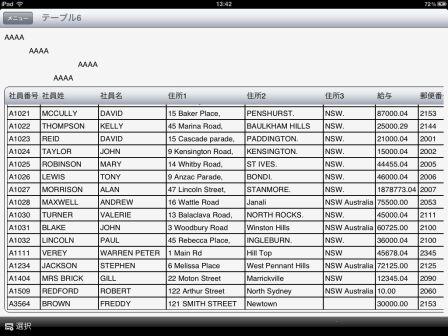
IMG_0423.jpg
IMG_0423.jpg (42.17 KiB) Viewed 7553 times
IMG_0424.jpg
IMG_0424.jpg (31.03 KiB) Viewed 7553 times
Do you have any idea what I'm missing??
I'd appreciate if you give me some advice.

I wrote the codes like this;
*For the first one:
#COM_OWNER.Set_Label Text('AAAA') Layout_Col(1) Layout_Row(1)
#COM_OWNER.Set_Label Text('AAAA') Layout_Col(2) Layout_Row(2)
#COM_OWNER.Set_Label Text('AAAA') Layout_Col(4) Layout_Row(3)
#COM_OWNER.Set_Label Text('AAAA') Layout_Col(3) Layout_Row(4)
#COM_OWNER.Set_Label Text(' ') Layout_Col(5) Layout_Row(4)
#COM_OWNER.Set_Table Name(Table1) Border_Thickness(1) Border_Cornerradius(10) Layout_Col(1) Layout_Row(5) Layout_Cols(5) Layout_Width(FIT)

*For the second one:
I modified only one code from above:
#COM_OWNER.Set_Label Text(' ') Layout_Col(5) Layout_Row(4) Layout_Width(FILL)
Paul

Re: Scrolling in table(RDMLX)

Post by Paul »

Hi Megumi,

Try setting the column containing the table to 'FIT' and remove the Layout_Cols(5) parameter from the Set_Table method call. Make sure none of the other formview columns are set to 'FILL'.

Paul
MegumiSawada
Posts: 268
Joined: Tue Feb 19, 2013 5:18 pm

Re: Scrolling in table(RDMLX)

Post by MegumiSawada »

Hi Paul,
Thank you for your advice.

However,I'm not able to get an expected result.
There are some labels,inputboxs and dropdowns above the table.
These takes 4 columns 5 rows above the table.
If I follow your instructions,the 2nd to 4th columns are pushed away to right side because 1st column is required to have enough width to contain the table.

I don't think what I'd like to do is so special. I wonder how everyone do this...?
Paul

Re: Scrolling in table(RDMLX)

Post by Paul »

Hi Megumi,

The problem is because the table spans multiple columns its width is not used to calculate the width of its own column in the normal way. With the current version of the LongRange client (and the next one comming soon) the only reliable option is to use a subform for the elements of the top rows.

The version of LongRange Client after the next new one there will be a new property, Layout.DistributeMultiCol, that will fix this issue without having to creat a subform.

To set up a sub form is quite simple just change your code to the following;

Code: Select all

* Subform for top rows
#COM_OWNER.Set_Form Name(SubForm) Layout_Row(1) Layout_Col(1)

* Subform Rows & columns
#Com_Owner.Using Element('SubForm.Fields') Alwaysrememberlast(True)
#COM_OWNER.Set_Label Text('AAAA') Layout_Col(1) Layout_Row(1)
#COM_OWNER.Set_Label Text('AAAA') Layout_Col(2) Layout_Row(2)
#COM_OWNER.Set_Label Text('AAAA') Layout_Col(4) Layout_Row(3)
#COM_OWNER.Set_Label Text('AAAA') Layout_Col(3) Layout_Row(4)
#COM_OWNER.Set_Label Text(' ') Layout_Col(5) Layout_Row(4)
#COM_OWNER.EndUsing

#COM_OWNER.Set_Table Name(Table1) Border_Thickness(1) Border_Cornerradius(10) Layout_Col(1) Layout_Row(2)


Now things should work as you expect.
MegumiSawada
Posts: 268
Joined: Tue Feb 19, 2013 5:18 pm

Re: Scrolling in table(RDMLX)

Post by MegumiSawada »

Hi Paul,

Thank you!!
Now it works as I expected!
Post Reply